
A teleprompter for TikTok and Instagram Reels on iPhone
Cue Teleprompter lets you read your script while filming TikTok videos and Instagram Reels on iPhone or iPad. Record in 4K with AI Voice, or float your script over the TikTok camera.
- TikTok
- YouTube
- Any other app
Free to download · iPhone & iPad · No account
- Works on
- iPhone and iPad
- Requires
- iOS 16 or later
- Camera
- Up to 4K 60fps
- Scrolling
- Constant or AI Voice
Record with the script right below the lens
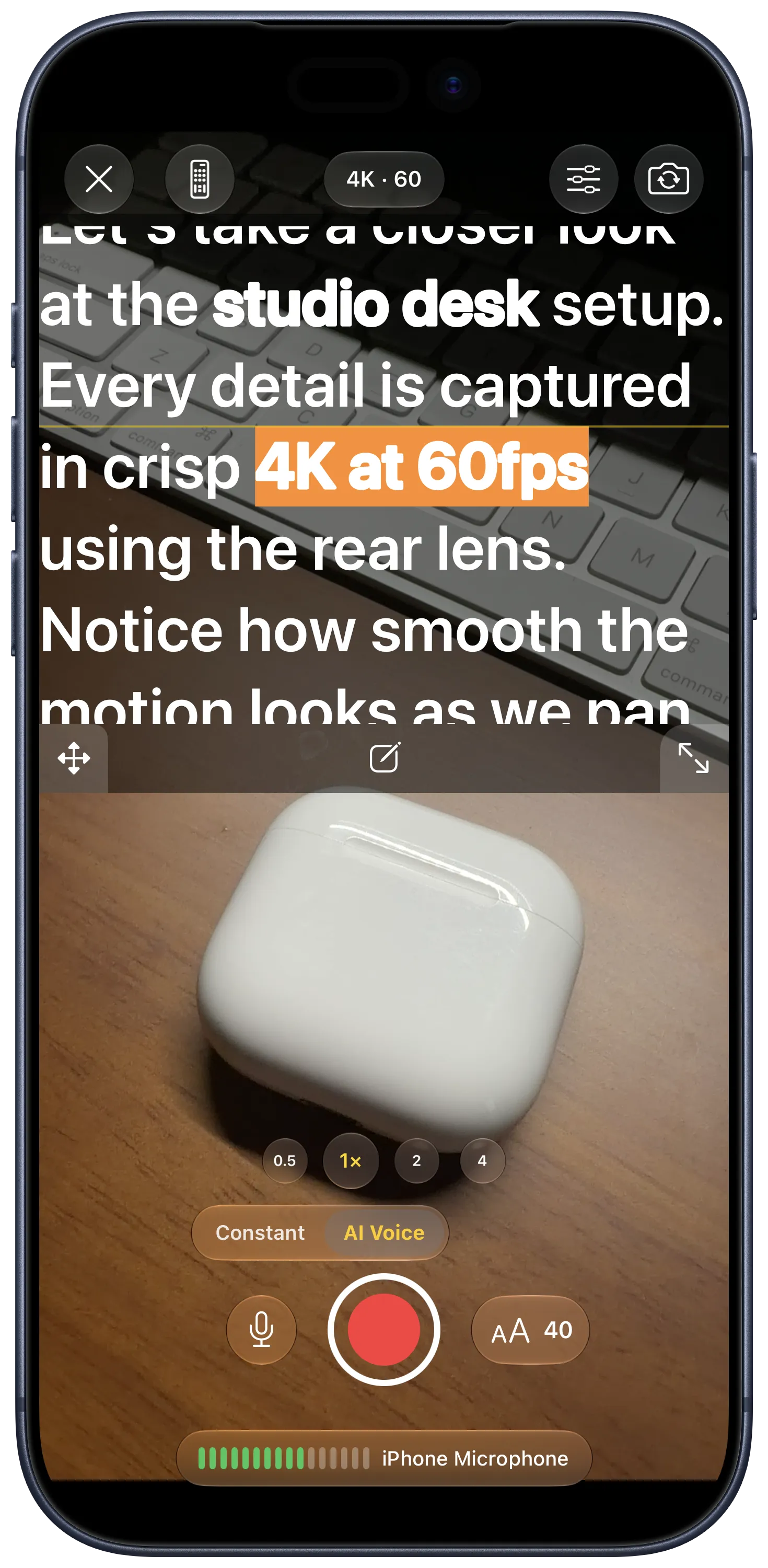
Tap Shoot in Cue Teleprompter to open the camera with your script in a movable box on top. Drag the box near the front camera, stretch it to resize, or move it to the bottom of the screen. Hold your phone upright for TikTok, Instagram Reels, and YouTube Shorts, or turn it sideways for horizontal video.
One tap above the record button switches between Constant speed and AI Voice scrolling, which moves as you speak, highlights the current word, and waits when you stop talking. You can shoot up to 4K 60fps on the front or back camera and record audio with the iPhone mic, an external mic, or AirPods.
Pause between cuts or use a second device as a remote
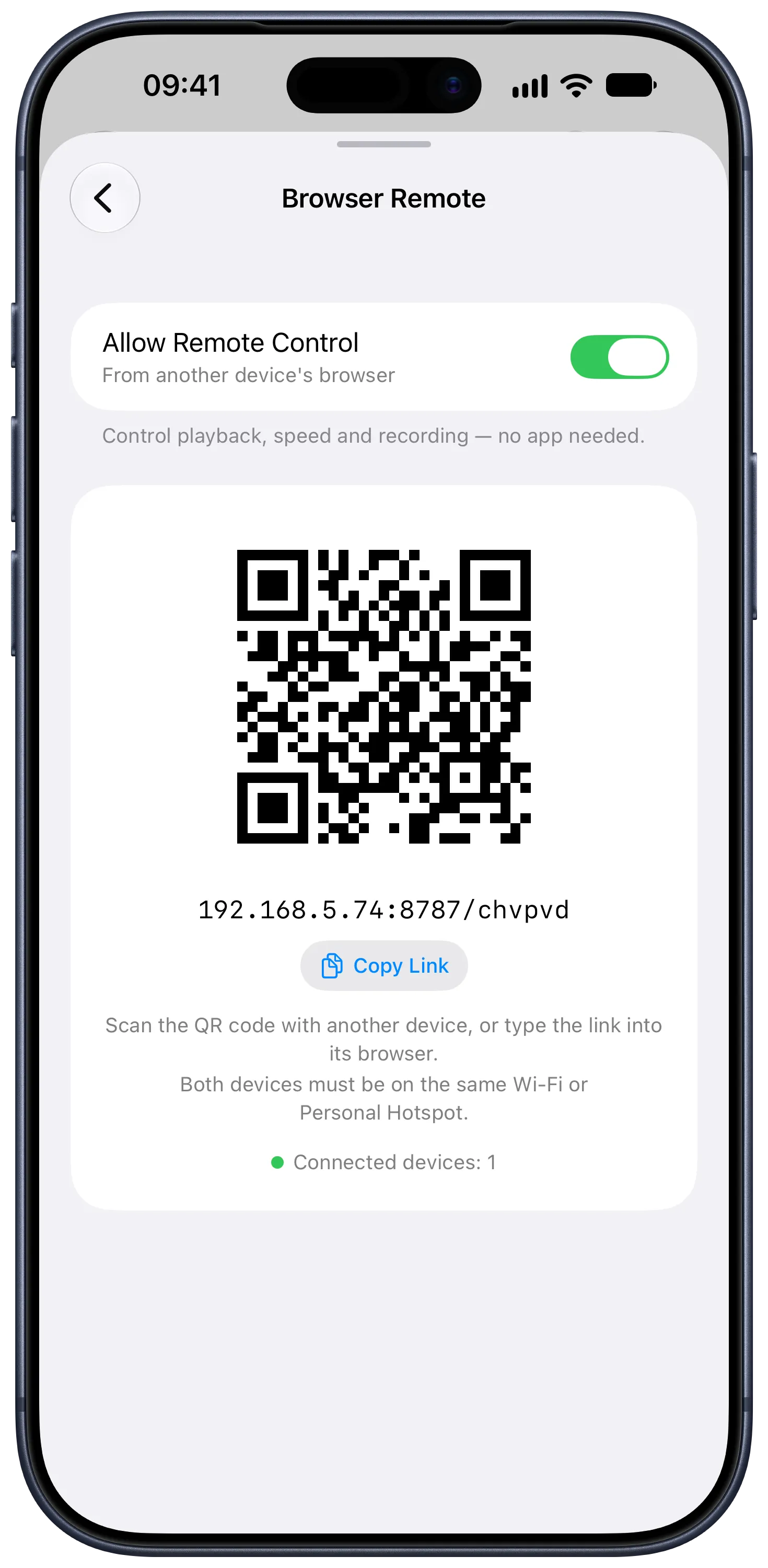
On iOS 18 and later, you can pause recording to change your framing or pick up a product, then resume filming into the same video file. If you step back to film with the back camera, scan the QR code in Cue using another phone or computer browser to start recording and control scrolling from across the room.
Finished takes stay in your script’s recording history instead of filling up your photo library. Open the recording details, tap Save to Photos on the take you want, and upload it to TikTok or Instagram to add music or captions.
Shoot in Cue or float over the TikTok camera
If you want to film with TikTok or Instagram filters, green screens, or timers, tap Floating in the editor to put a floating teleprompter window on top of their camera.
Because an iPhone only allows one app to use the microphone at a time, recording with sound in TikTok or Instagram takes over the mic and switches the floating window back to Constant scrolling. For more ways to film on iOS, see the comparison of the best teleprompter apps for iPhone.
| Feature | Shoot in Cue | Float over TikTok or Reels |
|---|---|---|
| Camera | Up to 4K 60fps | TikTok or Instagram filters and effects |
| Scrolling with sound | Constant or AI Voice | Constant speed |
| Microphone | iPhone, wired, Bluetooth, or AirPods | Handled by TikTok or Instagram |
| Pause and resume | Combines segments on iOS 18 or later | Handled by TikTok or Instagram |
| Posting | Save to Photos, then upload | Post directly in the social app |
How to film a TikTok or Reel in Cue
-
Write or paste your script
Open Cue Teleprompter and type your script or paste it from Notes.
-
Open the Shoot screen
Tap Shoot at the bottom of the editor and drag the script box close to the front camera.
-
Pick your scroll mode and record
Choose Constant or AI Voice above the record button, adjust text size or speed on either side, and tap record.
-
Save to Photos and post
Open the recording details, tap Save to Photos on your best take, and upload it in TikTok or Instagram.
Four ways to shoot vertical videos
Talking head videos
Let AI Voice follow your speaking pace so you can pause or ad-lib without losing your place.
Quick cuts in one take
Pause mid-recording on iOS 18 or later to switch angles or grab a prop, then resume in the same video.
Back camera solo shoots
Put your iPhone on a tripod and scan the QR code on another device to start recording from a distance.
TikTok and Reels effects
Use the floating window when your video needs a green screen, filter, or timer inside TikTok or Instagram.
Tips for filming TikToks and Reels
- Put stage directions like [smile] or [show product] in square brackets so they appear as visual cues you do not read aloud.
- Shrink the script box and place it right below the front camera so your eyes stay aimed at the lens.
- Set a 3, 5, or 10-second countdown so you have time to get into position before recording starts.
- Choose Constant scrolling before starting the floating window if you plan to record with sound inside TikTok or Instagram.
Frequently asked questions
Will the script show up in my recorded video?
No. Only you can see the script while filming. Your saved video only contains the camera footage.
Why does AI Voice stop when I record inside TikTok or Instagram?
An iPhone only lets one app use the microphone at a time. When TikTok or Instagram records sound, Cue switches the floating window to Constant scrolling. To record with AI Voice, film inside Cue instead.
Where do videos recorded in Cue go?
They stay in that script's recording history so failed takes do not clutter your camera roll. Open the recording details and tap Save to Photos to export a clip.
Can I use AirPods or an external microphone?
Yes. On the Shoot screen in Cue, you can select the built-in iPhone mic, a wired external mic, a Bluetooth mic, or AirPods.
Which languages work with AI Voice?
AI Voice runs offline on iPhone and supports English, Spanish, Portuguese, French, German, Italian, Chinese, Japanese, and Korean, depending on your device and iOS version.
More from Cue
Updated
All product names and logos are trademarks of their respective owners. Cue Teleprompter is not affiliated with or endorsed by them.